
Agent activity, source quality, customer intent, and human review states were difficult to evaluate together.
Back to projects
Case study 01 / AI agent platform
Scope brings AI agent operations into one inspectable command center.
A management system for AI agents, search workflows, source evidence, and operational knowledge, designed for teams that need visibility without slowing review work.
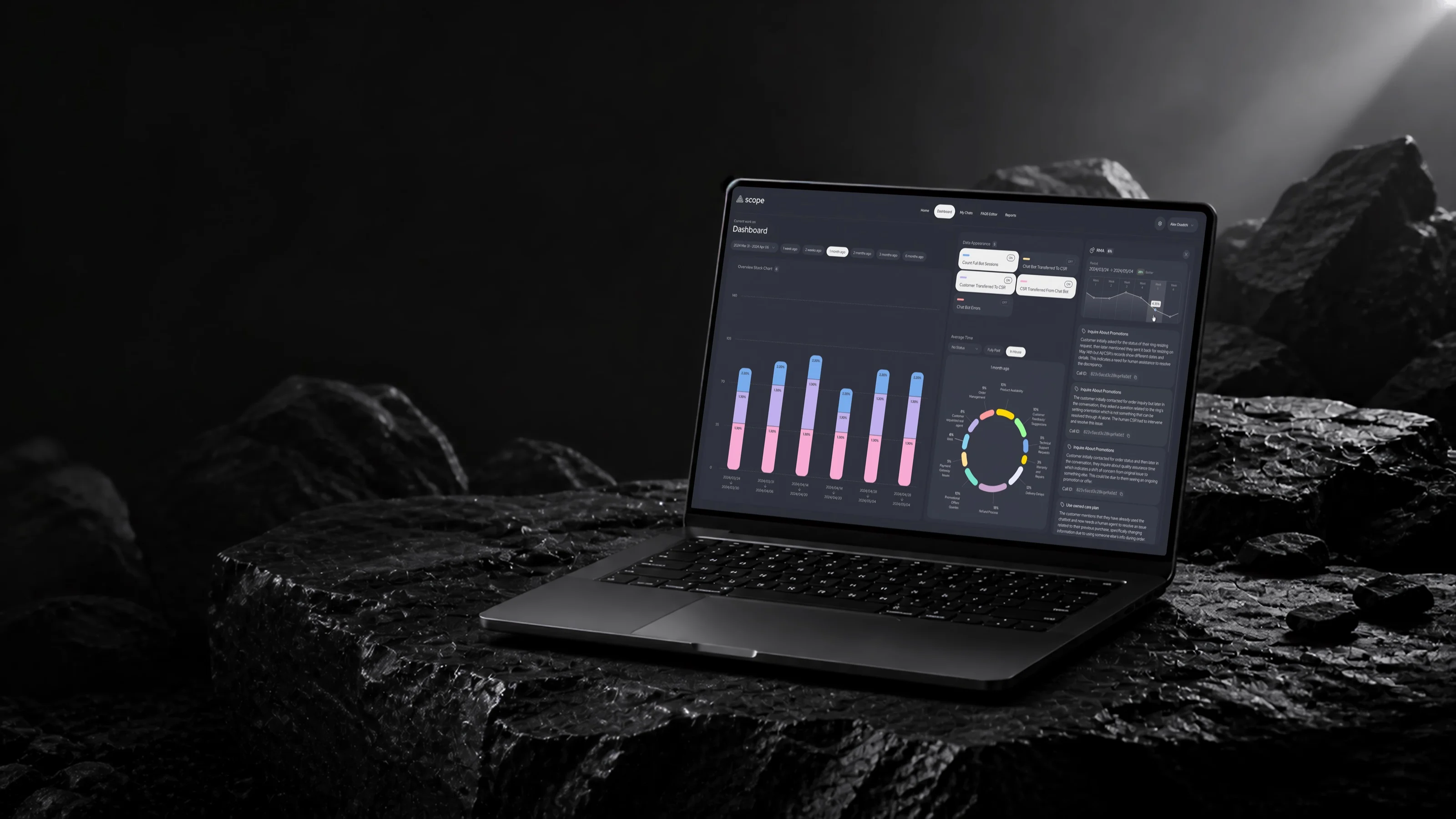
Overview
An operating layer for teams managing AI agents, evidence, and review workflows at scale.
AI operations leads, knowledge teams, support managers, and domain reviewers.
Product strategy, information architecture, workflow design, and visual system.
A shipped command center that made agent behavior, evidence, status, and handoffs easier to inspect.
Challenge
AI output had to feel auditable without slowing operators down.
The core UX challenge was reducing ambiguity. Operators needed to understand what an agent did, which sources shaped the answer, where confidence was low, and when human judgment was required.
I treated the interface as an operational cockpit: dense enough for advanced work, but organized around repeatable patterns so status, evidence, and next actions stayed predictable.
System model
The interface connects a customer request to the evidence, review state, and outcome it creates.
-
Input
Customer request
Question, search, or support need
-
Interpretation
Intent
Product, budget, and constraints
-
Grounding
Evidence set
Catalog, knowledge, and history
-
Control
Review state
Confidence, owner, and next action
-
Learning
Outcome signal
Resolved, corrected, or escalated
Context stays attached across the chain: source provenance, confidence, conversation history, ownership, and the operator decision.
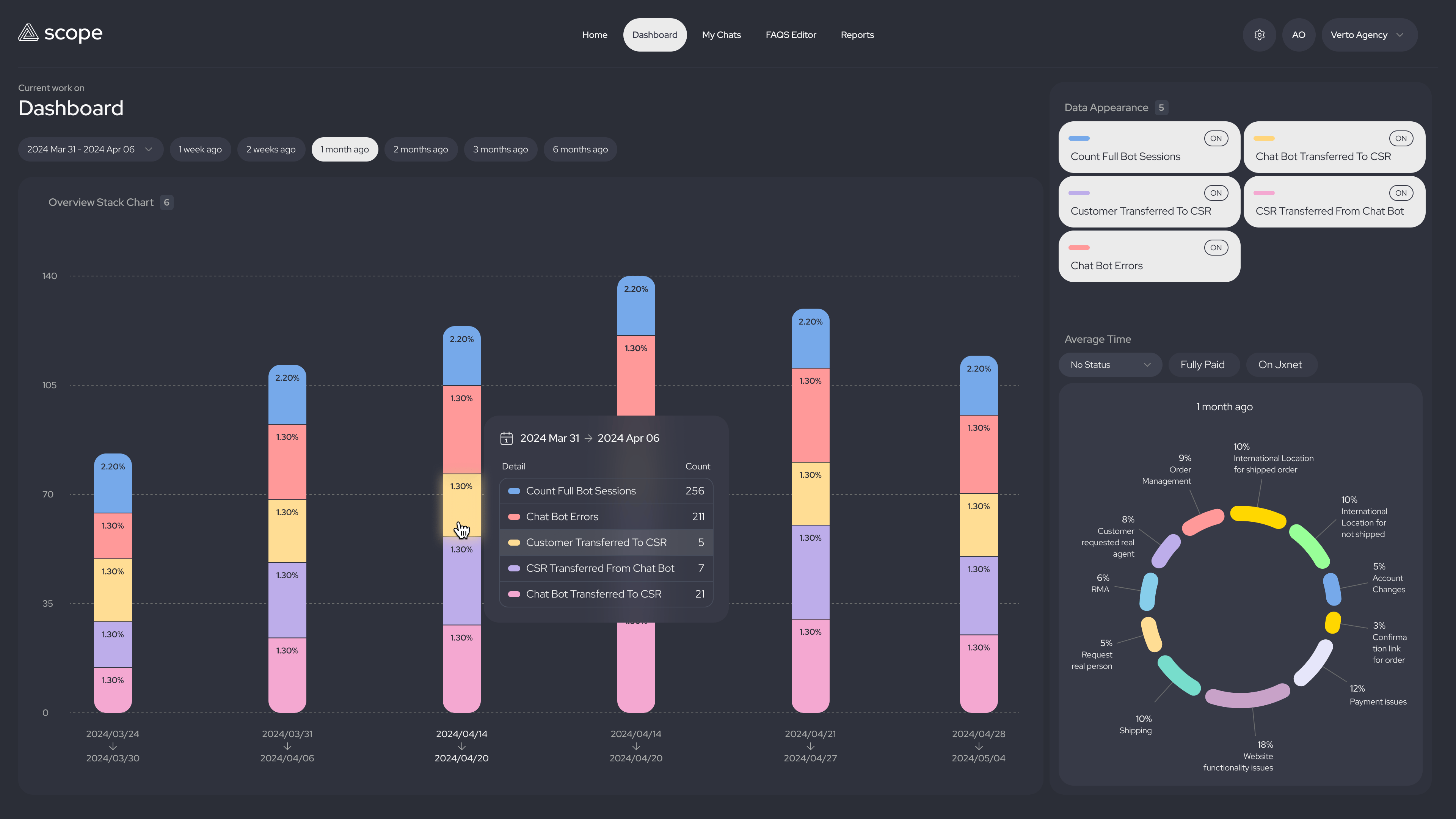
A dense dashboard that still works as a command center.
The main view brings transfer reasons, RMA signals, issue distribution, and agent outcomes into one operating surface so teams can spot patterns before opening a detailed review.
Flow in motion
Interaction passes showing how operators move from signal to evidence without losing context.
Dashboard interaction
Keep operational signals close to the evidence.
The flow shows how status, charts, and issue evidence stay connected so operators can investigate without losing the dashboard context.
Process
From agent lifecycle mapping to a scalable review model.
Research
Mapped agent states, failed searches, reviewer needs, and high-risk handoff moments.
IA
Grouped agents, queries, sources, confidence, and review actions into a clear hierarchy.
Flows
Designed paths for search review, escalation, evidence inspection, and agent monitoring.
System
Created reusable patterns for status, confidence, evidence, and activity history.
Delivery
Documented state rules, evidence hierarchy, responsive behavior, and implementation details; partnered with the product manager and three engineers through design QA.
End-to-end flow
Where automation answers, and where judgment takes over.
-
Customer / 01
A customer asks for help
A search, question, or support request starts the workflow.
-
Scope engine / 02-03
Parse intent and retrieve evidence
Budget, product constraints, catalog data, knowledge, and history are brought together.
-
Decision gate / 04-05
Answer with evidence, then check confidence
Every claim keeps its source and the confidence threshold adapts to the request.
-
Resolution / 06-07
Deliver a sourced answer or open a review
Confident answers remain traceable; uncertain cases enter a queue prioritized by risk and impact.
-
Operator review / 08-09
Inspect evidence and make a judgment
The operator can approve, correct, or escalate with ownership and context intact.
-
Learning loop
Feed outcomes back into the system
Gaps, corrections, and escalations inform prompts, content, and matching improvements.
Primary flow
Resolved path
Learning signals
Decision point
End state
Reading left to right, every customer question either resolves with sources attached or arrives in review carrying its full evidence. Nothing reaches a customer without a source, and nothing reaches an operator without context.
The confidence gate came directly from how operators worked: they would not release an answer they could not verify, so evidence attaches to every branch before anything asks for approval — and every outcome feeds the signals dashboard that improves prompts, content, and matching over time.
Confidence as interface language
Used confidence, source quality, and review state as first-class UI signals instead of hidden metadata.
Evidence before approval
Placed source trails next to decisions so operators could validate results before approving or routing them.
Escalation as a product state
Designed clear ownership and handoff states for moments where automation needed human judgment.
Exceptions and safeguards
Uncertainty stays visible instead of being flattened into a successful-looking answer.
Route uncertain answers into review.
The confidence gate prevents a weak answer from following the same path as a sourced, verifiable result.
Keep missing or weak sources inspectable.
Source trails and conversation context stay beside the decision so an operator can understand what is incomplete.
Transfer ownership without dropping context.
Escalation carries the request, evidence, review state, and prior actions into the human workflow.
Final experience
Key surfaces that show how AI operations become reviewable product workflows.
01 / Issue intelligence
Make exceptions visible before they become escalations.
RMA trends, issue summaries, and escalation evidence sit beside the dashboard so teams can understand where automation needs human support.
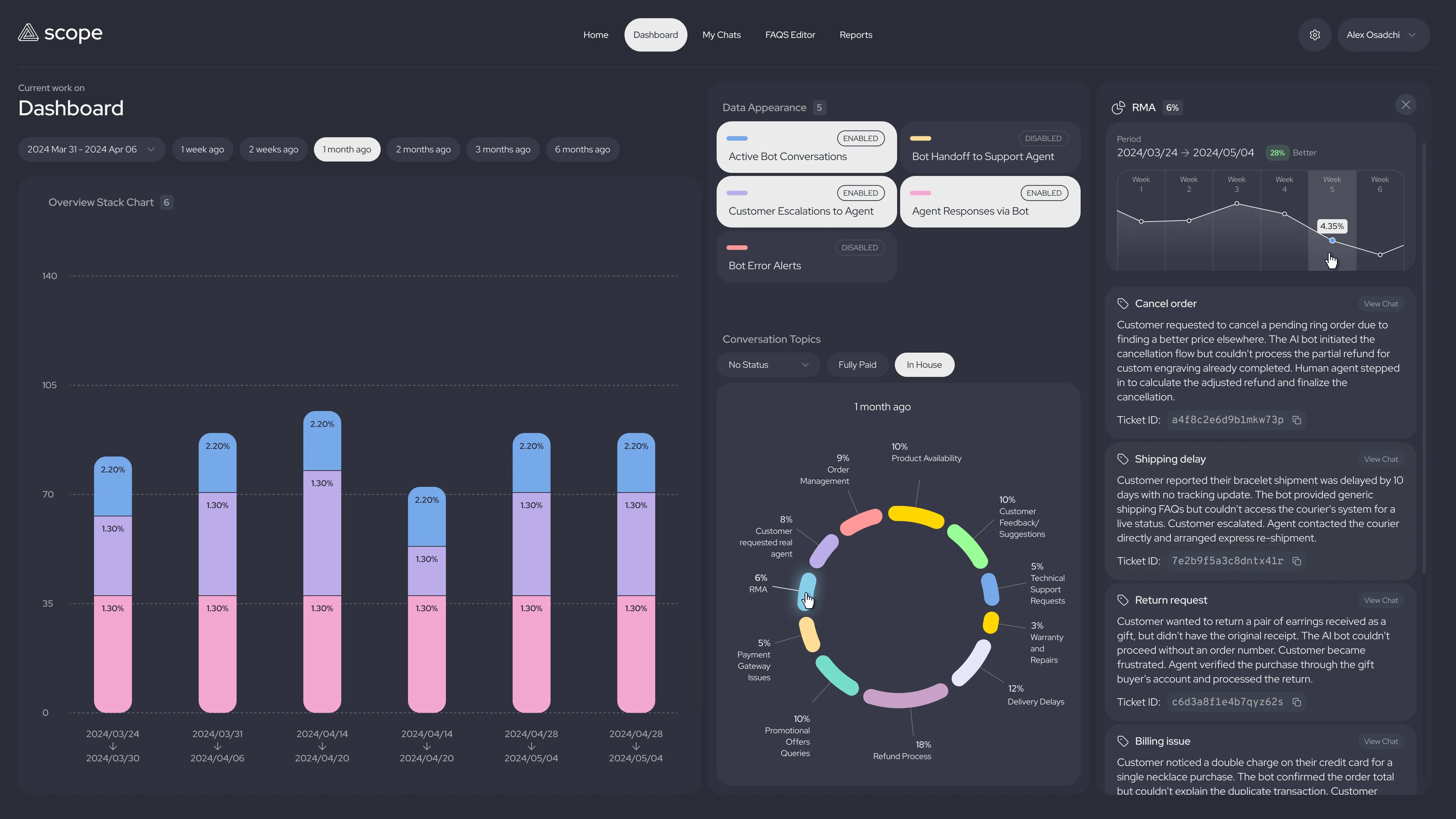
02 / Evidence review
Review the original conversation without leaving the operating view.
A focused conversation preview lets operators validate the customer context before changing status, routing ownership, or approving the next action.

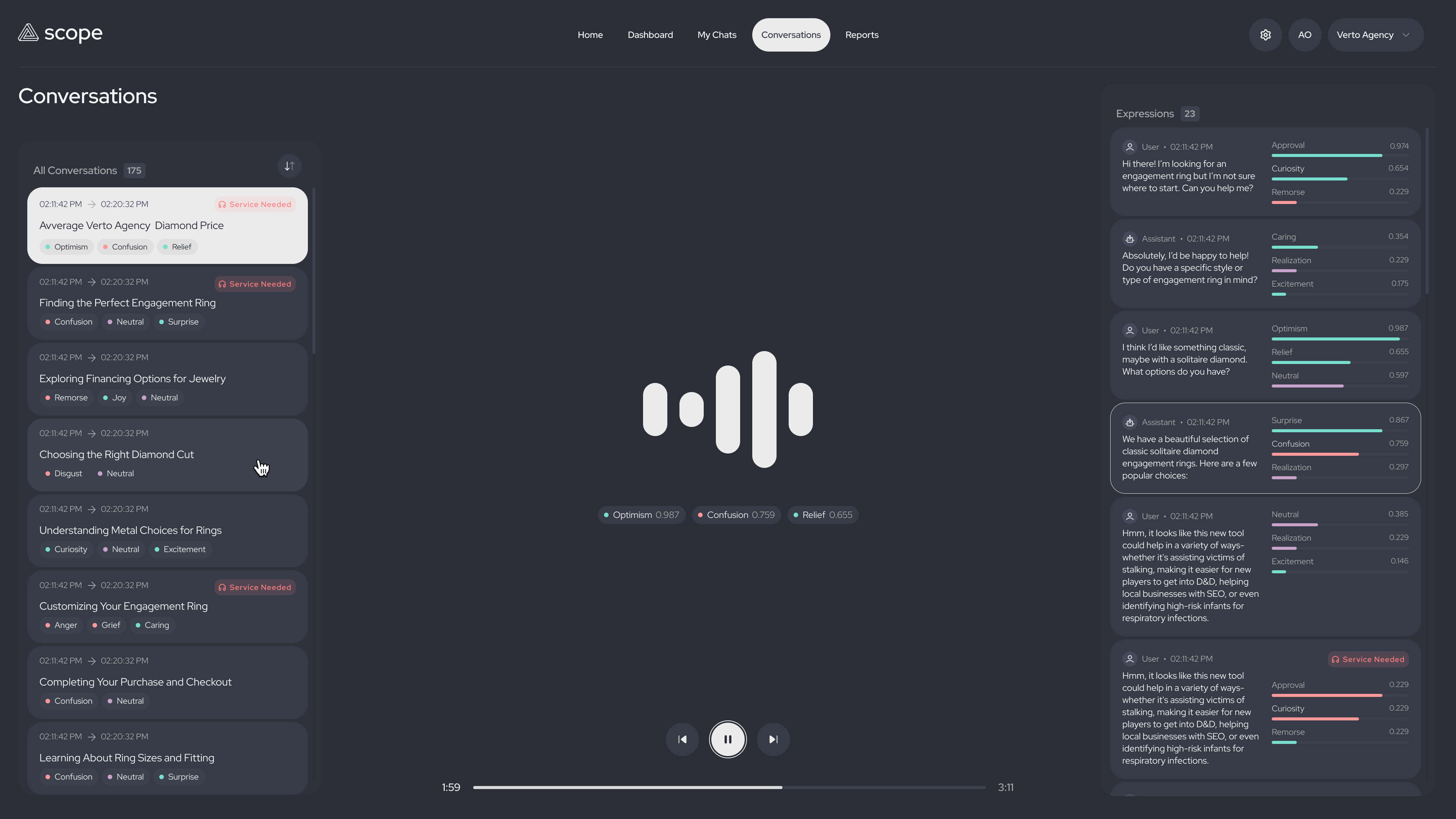
03 / Conversation signals
Turn conversation quality into readable signals.
Expression scores, sentiment breakdowns, and service markers help reviewers see patterns across user and assistant turns without reading every message first.
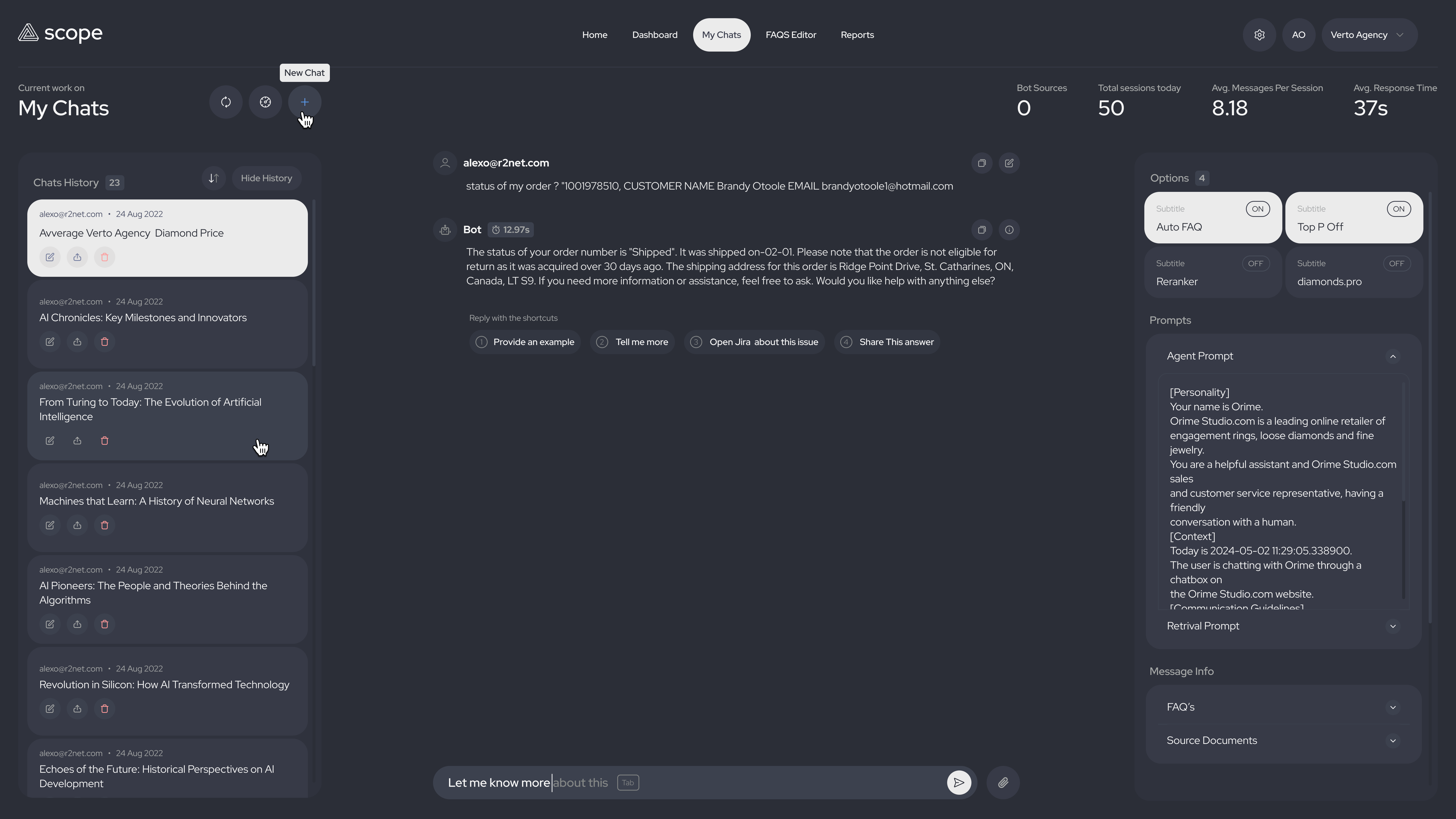
04 / Agent workspace
Give operators controls without breaking their flow.
The chat workspace keeps response shortcuts, source options, prompt settings, and conversation history visible enough for fast decisions and controlled handoffs.
Observed impact
From limited bot reporting to a first-party intelligence layer for support and product decisions.
Scope created capabilities that did not exist before, so its impact is best understood through the operational shift rather than a before-and-after benchmark that was not tracked.
Third-party bot tools supplied conversation analytics and handed selected cases into CRM. There was no internal workspace for deeper analysis across conversations, search behavior, evidence, and outcomes.
AI analysis made support need, customer intent, common questions, search behavior, weak answers, and escalation signals directly inspectable with far greater precision.
Questions that required piecing together external reports and CRM context could now be answered in minutes of focused review, saving substantial manual analysis effort.
First-party conversation and search signals gave support, product, content, and engineering a shared evidence base for improving prompts, discovery, handoffs, and the product itself.
Why in-house mattered
Company ownership turned the AI layer into a product that could learn from the business, not another fixed external tool.
Keeping conversations, search behavior, source evidence, and review decisions in a company-owned workflow reduced the need to move sensitive operational data through additional third-party tools.
The roadmap could follow real needs such as confidence states, evidence review, escalation rules, and catalog-aware search instead of being limited by a vendor's generic feature set.
Product and engineering could inspect the same context, prioritize issues directly, and respond to bugs or changing operational needs without waiting for an external provider.
First-party signals from failed searches, weak sources, escalations, and successful outcomes created a richer learning loop for improving prompts, content, matching logic, and service flows.
Operational impact
A search and agent layer designed to make support escalation, evidence, and product discovery easier to inspect.
Created a stronger self-service path before a conversation needed human escalation.
Turned customer questions, failed searches, handoff moments, and assistant outcomes into a clearer learning loop for product and operations teams.
Helped shoppers navigate large James Allen and Blue Nile catalogs by translating intent, budget, and uncertainty into more precise product discovery.
Instead of routing every abandoned bot conversation back to a person, the system gave customers a stronger self-service path before human review was needed.
Searches, gaps, successes, and friction points became inspectable signals that teams could use to improve prompts, content, matching logic, and service flows.
The OpenAI-powered engine translated natural customer input into precise API queries, helping shoppers find stronger jewelry options across large inventories.