
Publishing, approvals, content structure, and permissions were spread across too many tools and routines.
Back to projects
Case study 04 / Governed CMS platform
Content Toro brings publishing operations into one governed workspace.
A content management system for campaign planning, structured content, editorial approvals, roles, reusable templates, and ongoing site operations.

Overview
A CMS workspace for teams that move quickly but still need publishing control.
Content managers, marketers, editors, reviewers, and site operations teams.
Product design, workflow design, CMS IA, interface system, and visual direction.
A shipped editorial system with clearer publishing states, ownership, and review readiness.
Challenge
The product had to feel simple for editors and powerful enough for governance.
Campaign setup lived across email threads, Slack follow-ups, and developer handoffs — a maze of permissions, fields, drafts, scheduled updates, and QA checks. The challenge was to make that complexity legible without hiding the controls teams rely on.
I focused on modular content models, clear editorial states, and side-by-side review patterns so teams could understand what is live, what is blocked, and what needs attention.
Content model
Reusable page structure connects campaign intent to components, assets, and governed publishing states.
-
Planning
Campaign
Timing, placement, and ownership
-
Structure
Page
Template, sections, and editorial state
-
Composition
Component
Reusable fields and display logic
-
Content
Asset
Media, metadata, and validation
-
Governance
Publish state
Review, approval, schedule, and history
Roles and owned transitions sit across the model, so editors can work quickly while reviewers and operations teams keep control of what is ready to go live.
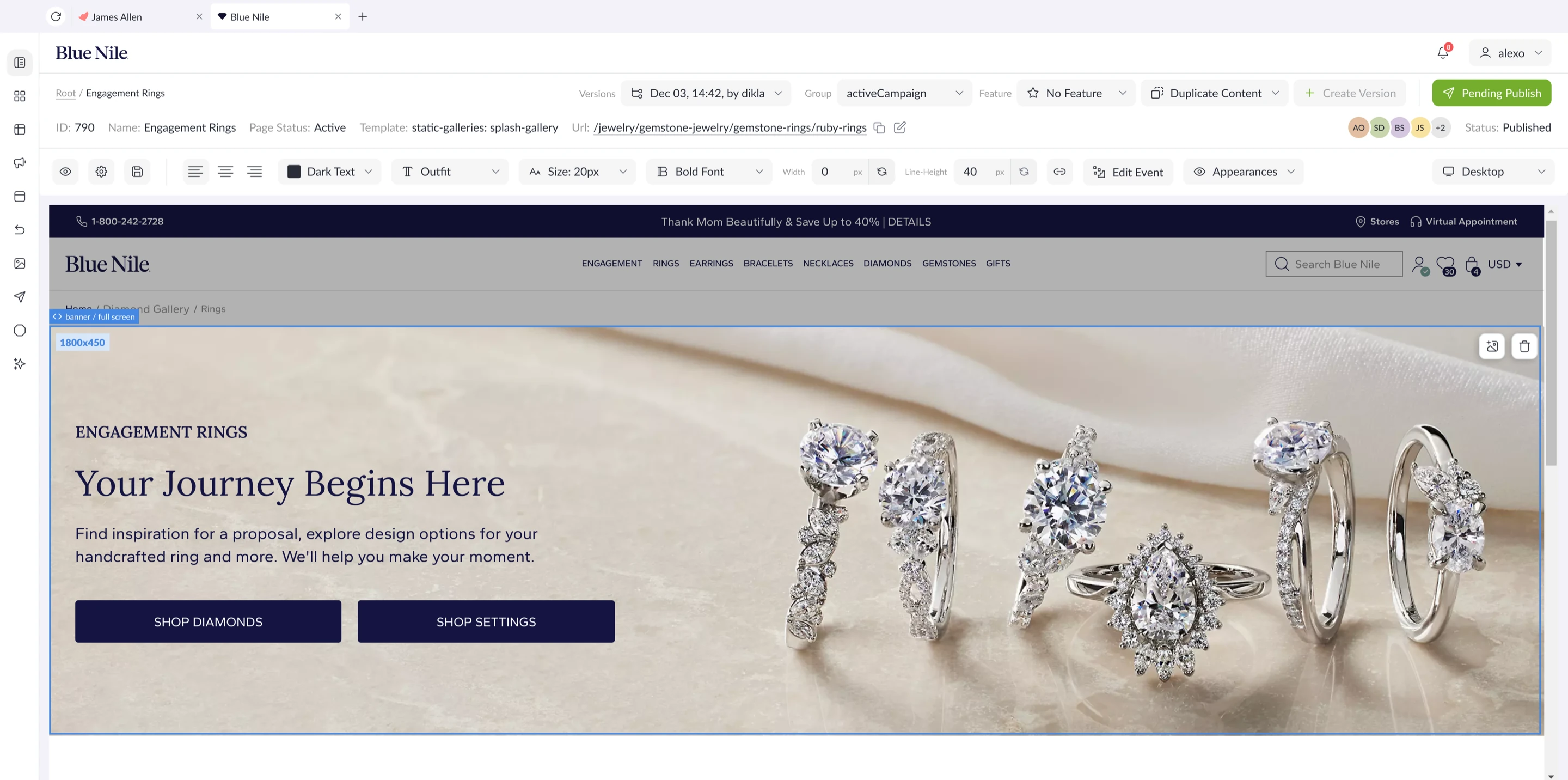
A structured CMS workspace that keeps editors oriented.
The selected component, page context, governance controls, and preview canvas stay close together so teams can edit live content without losing review context.
Flow in motion
Editorial flows showing how content teams move from planning to reusable page structure.
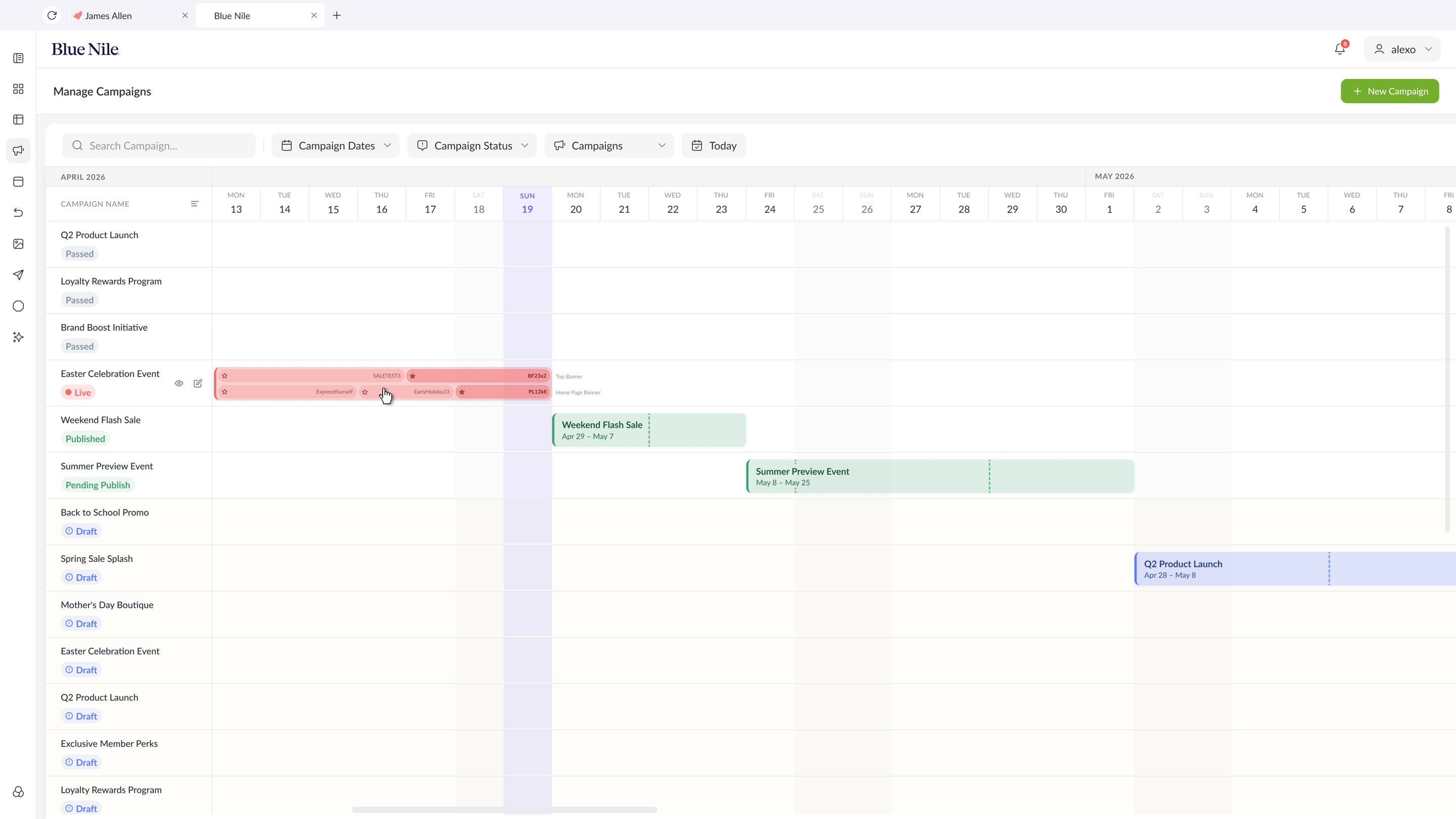
Campaign planning
Make scheduled content visible as an operating timeline.
The calendar flow shows how campaign density, dates, and placement activity can be scanned without opening every item.
Process
From publishing pain points to a reusable editorial operating model.
Research
Mapped content team routines, approval friction, page ownership, and publishing risk.
Model
Defined content types, fields, media rules, workflow states, and role permissions.
Flows
Designed paths for create, edit, review, schedule, publish, archive, and restore.
System
Created reusable states for drafts, warnings, approvals, history, and validation.
Delivery
Specified dense tables, editor panels, preview behavior, and bulk publishing actions; partnered with the product manager and three engineers through implementation and design QA.
End-to-end flow
From draft to live, every transition belongs to a role.
-
Editor / Create
Turn a campaign or page need into a draft
Editors compose structured content from the campaign calendar and reusable page building blocks.
-
Editor / Submit
Move the draft into review
The reviewer receives a side-by-side preview with the content and its placement context.
-
Reviewer / Decide
Approve or return with actionable notes
Changes loop back to the editor without losing status, ownership, or review history.
-
Content manager / Schedule
Set timing and placement after checks pass
Required fields and media validation act as the publish gate.
-
Scheduler / Publish
Move approved content live
The published state remains connected to its schedule, owner, and lifecycle history.
-
Operations / Archive
Preserve history and keep restoration possible
Archived work remains traceable and can return to the governed lifecycle when needed.
Lifecycle state
Transition owner
Approval path
Returns & restore
Publish gate
Reading the lifecycle left to right: draft, review, scheduled, and published stay visible on every content item, and nothing goes live without passing media and field checks at the publish gate.
Every transition is an action a specific role owns — approve, return with notes, schedule, archive. Role and access administration itself lives in a dedicated permissions system, which keeps governance inside the CMS feeling like product feedback rather than admin work.
Editorial states stay visible
Kept draft, review, scheduled, and published states close to every content item.
Structure before decoration
Prioritized content models and field logic so the UI could scale across many page types.
Governance without friction
Designed role and approval logic as product feedback, not as a separate admin burden.
Exceptions and safeguards
Publishing remains reversible when validation fails, review changes, or live content needs to leave the site.
Stop incomplete content before scheduling.
Required fields and media checks remain part of the publish gate instead of becoming a late QA surprise.
Return work with status and context intact.
Reviewers can send content back with notes while preserving ownership, preview context, and the route to resubmission.
Keep content history available after removal.
Archived work stays traceable and can return to the governed lifecycle without recreating the page from scratch.
Final experience
A publishing system that makes status, structure, and ownership immediately readable.
01 / Campaign calendar
Turn publishing activity into a timeline teams can trust.
The campaign grid makes dates, status, ownership, campaign density, and placement details visible so editors can understand what runs, when, and where.
02 / Component editing
Edit page components in context, not in a separate admin surface.
Component-level controls sit directly above the page preview so teams can inspect layout, update carousel items, and manage appearances while still seeing the customer-facing result.

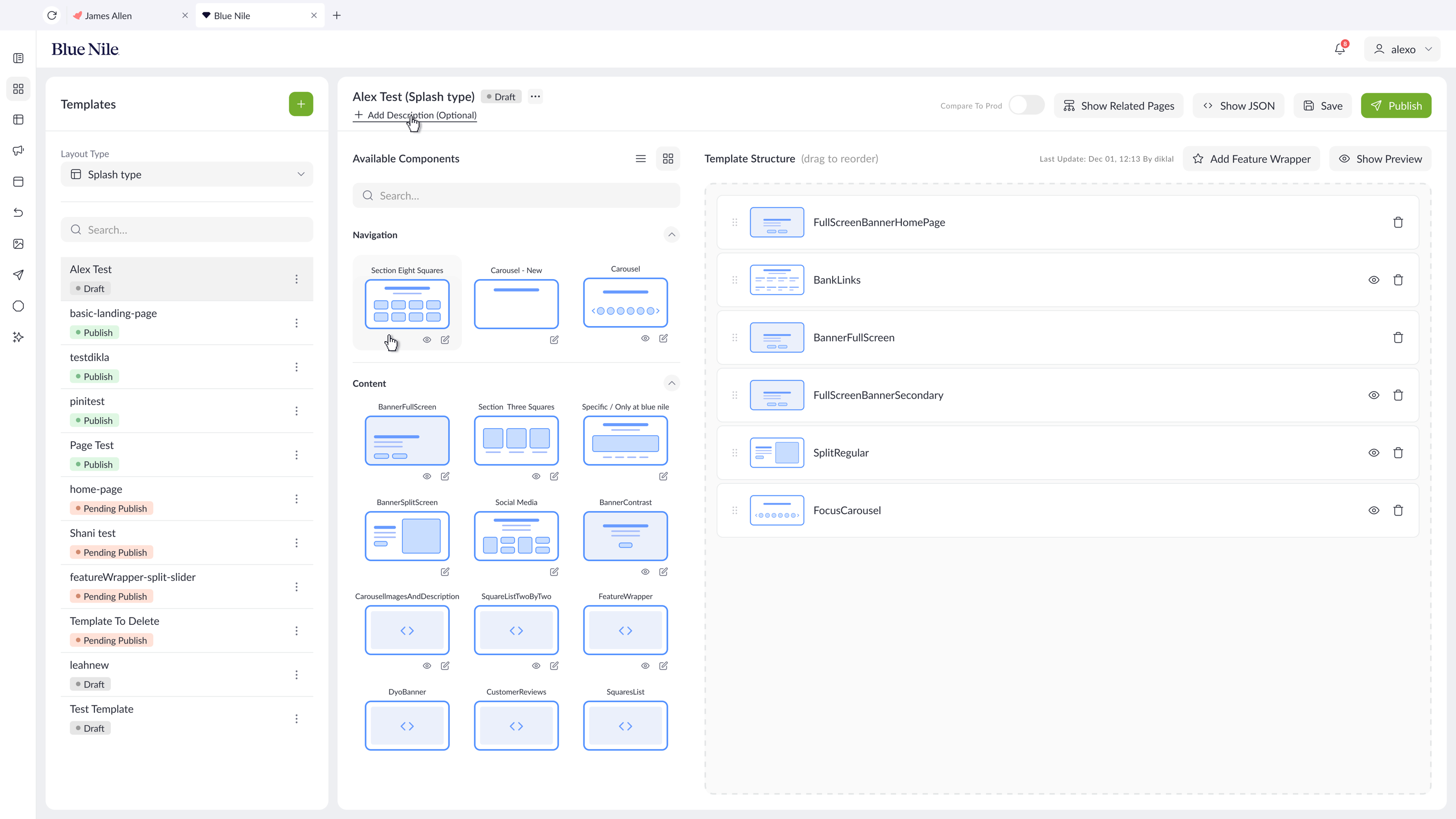
03 / Template builder
Let teams compose pages from governed building blocks.
The template builder separates available components from template structure so designers and content teams can add, reorder, preview, and publish layouts without breaking the page model.
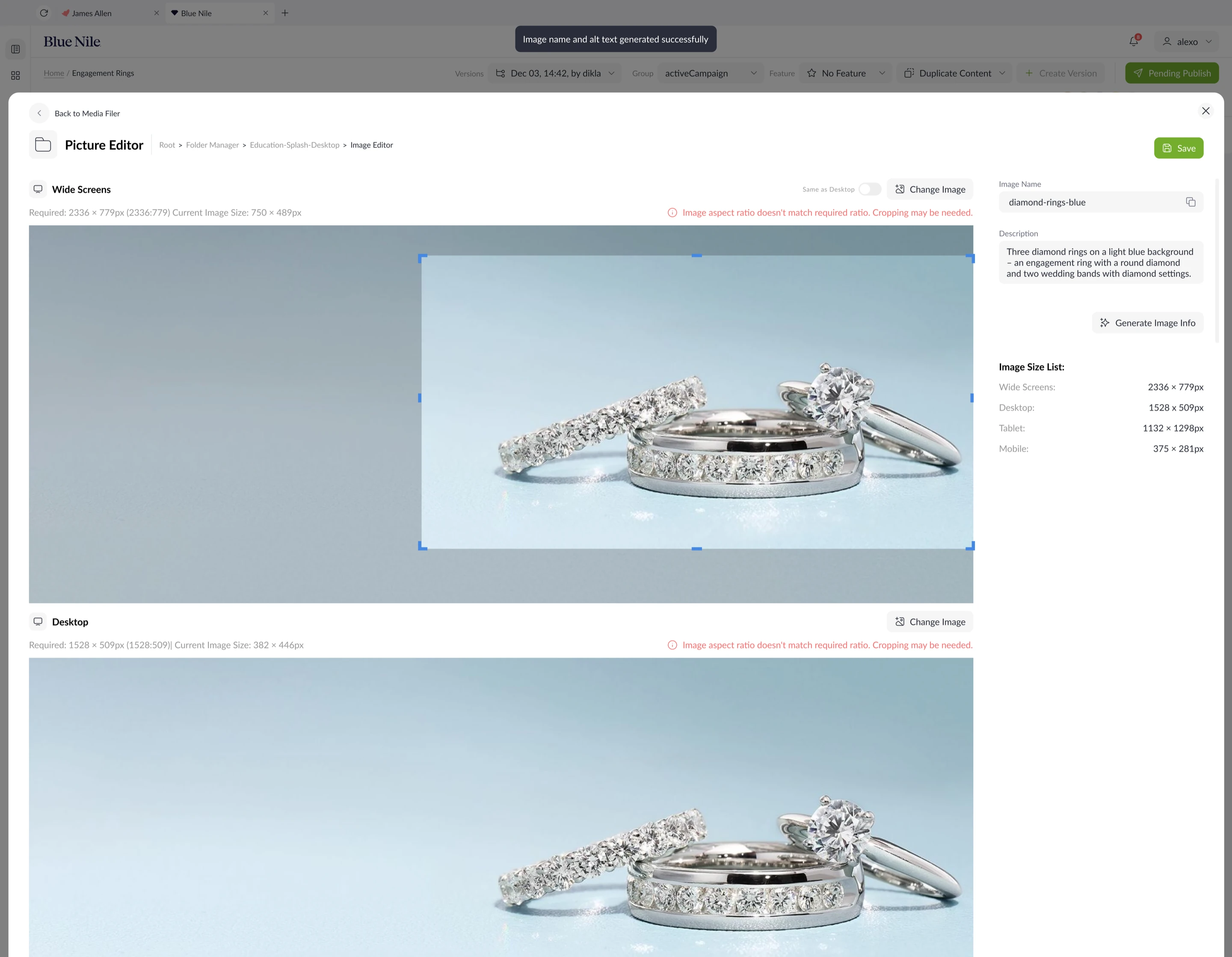
04 / Asset governance
Catch media issues before they reach a page or campaign.
The asset editor keeps image ratios, crop warnings, title fields, alt text, and required sizes in one review state so teams can fix metadata and presentation issues before launch.
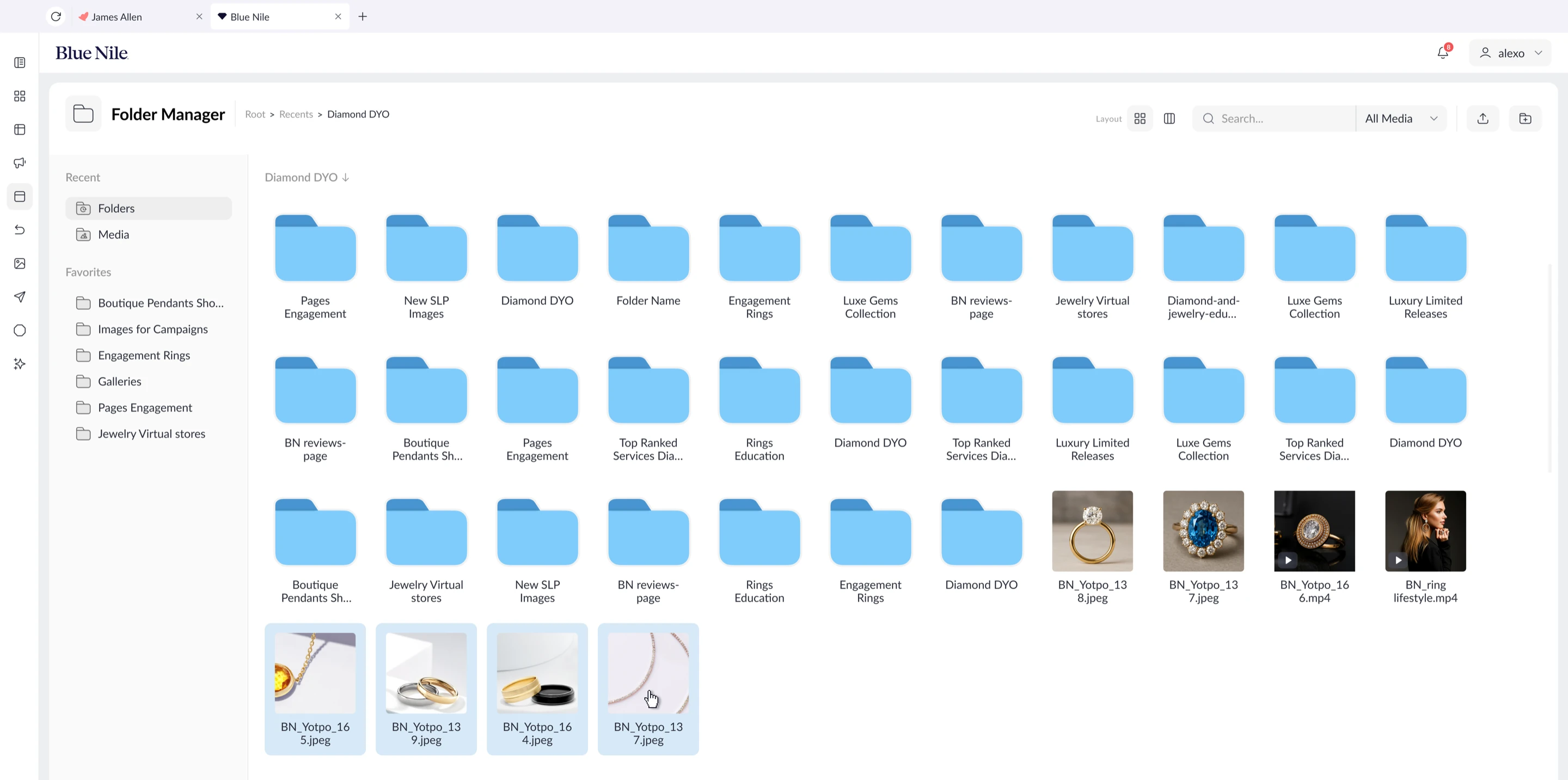
05 / Media operations
Make bulk organization feel controlled, even at library scale.
The folder manager keeps hierarchy, selection state, layout controls, filters, and upload actions visible so teams can move through large media libraries without losing context.
Observed impact
From every content change needing development to governed self-service.
There was no previous CMS to benchmark. The impact is the creation of a new operating capability for content, marketing, product, and engineering.
Every asset upload, text change, layout update, and campaign adjustment depended on developers. There was no internal or third-party CMS for routine publishing work.
Content teams gained governed self-service for assets, copy, templates, placements, approvals, previews, scheduling, and lifecycle management.
Routine work that could wait hours or days for engineering can now be completed in minutes, while validation and approvals keep higher-risk changes controlled.
Internal developers can focus more attention on new capabilities, complex logic, integrations, and bugs instead of acting as the execution layer for every content update.
Why in-house mattered
A company-owned publishing platform replaced developer-mediated updates with a workflow that could evolve around the company's brands, controls, and teams.
Campaign logic, assets, approvals, schedules, and publishing decisions could live in one company-controlled environment instead of being coordinated through code changes and separate handoffs.
Templates, roles, validations, brand-specific components, and lifecycle states could be added around the company's real publishing model rather than a generic CMS roadmap.
Content, product, and internal engineering could reproduce issues together and respond to bugs or urgent campaign needs without waiting for an external vendor.
Usage, validation failures, workflow delays, asset reuse, and publishing outcomes could become structured signals for improving both the product and the content operation.
Operational impact
A shipped CMS that simplified campaign work while preserving governance.
Moved routine campaign setup out of scattered tools, email threads, Slack follow-ups, and developer handoffs.
Gave product, content, copywriting, and review teams a shared workspace for logic, placements, assets, copy, scheduling, and readiness.
Protected engineering time by shifting common content and campaign changes into governed self-service flows.
Coupon logic, campaign values, content assets, copy, development, and quality review were brought into a clearer publishing path.
Teams no longer needed to stitch campaign work across separate systems, async messages, and repeated status checks.
Status, ownership, scheduling, previews, and asset checks made it easier to see what could safely go live.